Executive answer: Plaky’s free plan does the one thing that usually forces small teams to pay for project software: it allows unlimited users. Asana caps its free tier at 10 people. Plaky doesn’t cap it at all. The automation and reporting features it gates behind Pro are the kind of thing a 15-person team can live without for a while. The trade-off is a thinner integration ecosystem than Trello, Asana, or monday.com. We also found a reliability gap in the evidence itself — real bug reports, but not the independent uptime data we could pull for its sister product, Pumble.
Quick Verdict
| Best for | Small to mid-sized teams that want Trello-simple boards without a per-user cost as the team grows |
| Not ideal for | Teams that need deep third-party integrations or complex cross-project reporting today |
| Biggest strength | Unlimited free users, boards, and items. A genuine outlier next to Asana’s 10-person cap. |
| Biggest weakness | Integration ecosystem still trails Trello, Asana, and monday.com |
| Value for money | Excellent at Free. Pro’s $3.99-a-month entry price is hard to beat for what it unlocks. |
| Overall | Recommended for teams that want simplicity and free-tier headroom over integration depth. |
- Unlimited users on the free plan, unlike Asana’s 10-person cap
- Users switching from Trello, Asana, or Notion consistently call it simpler without feeling stripped-down
- Integration ecosystem is still noticeably behind Trello, Asana, and monday.com
- Automations are entirely absent from the free tier despite being a marketed feature
What Plaky Actually Is
Plaky is a project management tool from CAKE.com, the same company behind Clockify and Pumble. It sits between Trello and Asana on purpose. You get boards and tasks like Trello, but with more structure underneath once you’re on a paid plan: custom fields, dashboards, and automations. As of August 2026, Plaky reports 226,491 users on its own homepage. That’s a vendor figure, not an independent audit. It’s roughly in line with the review volume we found: 21 Capterra reviews at a 4.9/5 average. That’s a strong score, but the sample is small enough that it shouldn’t be read as proof of anything statistical.
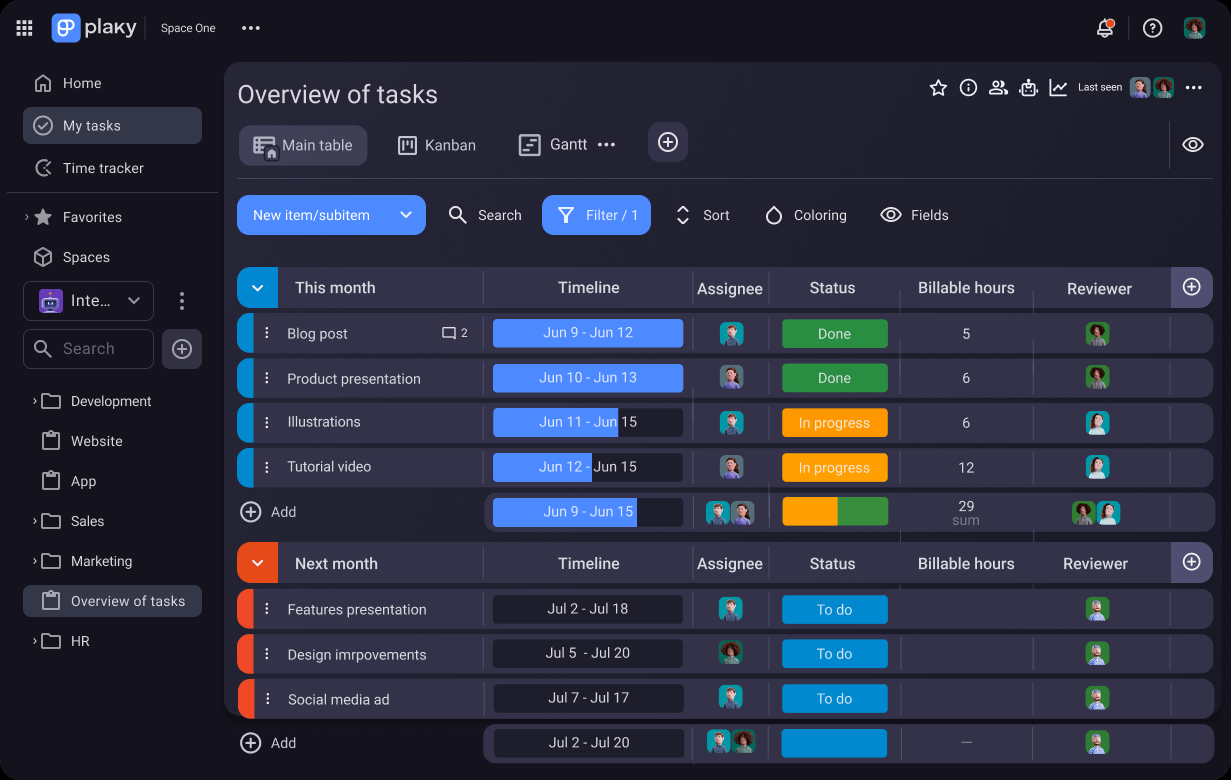
The board supports three views out of the box: Main Table, Kanban, and Gantt, switchable from the same tab bar shown above. That’s more structure than Trello’s card-only model, without the steeper setup Asana or monday.com ask for. Whether that middle ground fits your team depends on how much reporting and automation you actually use today, versus what you might need in a year.
Key Features
- Unlimited spaces, boards, items, and users — on the free tier, with no seat-based cost trigger.
- Three board views — Main Table, Kanban, and Gantt, available even on Free.
- Custom fields — 6 per board on Free. Unlimited on Pro and up.
- Board automations — Pro tier only, 1,000 actions a month, unlimited at Enterprise. Not on Free at all.
- Private dashboards, boards, and spaces — Pro tier. Useful once you need to segment visibility across teams or clients.
- Board-level permissions and SSO — Enterprise tier, aimed at organizations with formal access rules.
Product Overview
Plaky solves the gap between Trello and Asana. Trello’s cards-and-checklists model feels too flat once a team needs real reporting. Asana’s task hierarchies and pricing can be more than a small team needs. Plaky’s answer is one board with three interchangeable views. A task list looks the same whether you view it as a table, a Kanban board, or a Gantt timeline. The free tier keeps all of that with no user cap, which is the biggest thing separating it from Asana’s headcount paywall.
Real-World Use Cases
- A 20-person marketing team runs its whole campaign pipeline on Free. Kanban handles in-progress work, the table view holds the master campaign list. Asana would charge for this past 10 users.
- An agency billing clients by project uses Pro’s private boards and spaces. Each client sees only their own work.
- A team that leans on recurring automation needs Pro at minimum. Free includes zero automations, a real gap between the pitch and the free product.
- A CAKE.com customer already on Clockify gets automatic task-change notifications inside Pumble, thanks to the deeper Plaky-Pumble integration CAKE.com built out through 2026.
Pricing
| Plan | Price (annual, per user) | Key additions |
|---|---|---|
| Free | $0 | Unlimited users, boards, items; 6 custom fields per board; 10 MB file storage; 7-day activity log |
| Pro | $3.99/mo | Unlimited custom fields, Gantt view, automations (1,000 actions/mo), private boards, 25 MB file storage |
| Enterprise | $8.99/mo | Board permissions, unlimited automations, SSO, custom subdomain, 100 MB file storage |
| CAKE.com Bundle | $12.99/mo | Enterprise Plaky, plus Pumble and Clockify, bundled together |
Monthly billing adds roughly 20-25% per tier. Pro is $4.99 a month billed monthly, versus $3.99 billed yearly. Enterprise is $10.99 versus $8.99. All figures come straight from Plaky’s own pricing page as of August 2026. Prices and plan details change, so double-check current numbers before you buy.
Feature/Value Comparison: Plaky vs. Trello vs. Asana
| Plaky | Trello | Asana | |
|---|---|---|---|
| Free tier users | Unlimited | Unlimited | Capped at 10 |
| Free tier automations | None | Limited (Butler) | Limited |
| Native Gantt view | Yes (Pro+) | No (add-on required) | Yes (paid tiers) |
| Task hierarchy depth | Moderate | Flat (cards + checklists) | Deep (subtasks, dependencies) |
| Integration ecosystem | Limited | Extensive | Extensive |
The integration row is where Plaky’s trade-off shows up clearest. Trello and Asana both connect to hundreds of third-party tools through mature app marketplaces. Plaky’s is still growing. If your workflow depends on one specific integration outside the CAKE.com ecosystem, check it’s actually supported before you switch. This is Plaky’s clearest, most consistently cited limitation across independent comparisons.
Pros and Cons
| Pros | Cons |
|---|---|
| Unlimited free users — a genuine edge over Asana’s 10-person cap | Integration ecosystem still trails Trello, Asana, and monday.com |
| Three board views (table, Kanban, Gantt) available even on Free | Zero automations on the free tier despite automation being a marketed feature |
| Reviewers switching from Asana or Notion consistently call it simpler, not stripped-down | Mobile app is portrait-only and doesn’t support swipe-to-move on Kanban cards |
| Cheap entry price at Pro ($3.99/month) for what it unlocks | Only the space creator can delete that space — a real permissions limit some reviewers flagged |
Alternatives
- Trello — simpler still, with the largest Power-Up integration ecosystem here. No native Gantt view, and a flatter task structure.
- Asana — deeper task hierarchies, dependencies, and cross-functional reporting. You pay for it with a 10-person free-tier ceiling and a steeper learning curve.
- monday.com or ClickUp — worth a look if integration breadth matters more than where Plaky’s roadmap is today. Both have more mature app ecosystems right now.
Why the unlimited-users free tier actually changes the math
Asana’s free tier stops working the moment an 11th person joins. That pushes growing teams toward a paid plan on a timeline set by headcount, not by need. Plaky removes that trigger entirely. A 25-person team pays exactly what a 3-person team pays on Free: nothing. The upgrade lever instead is automation and reporting depth, which matters more to teams running complex recurring workflows than to a team that just needs a shared, visible task list. For that second group, Plaky’s free tier isn’t a limited trial. It’s the whole product.
The reliability question we couldn’t fully answer
For Pumble, we found independent uptime monitoring that gave us a real, checkable incident count. We could not find an equivalent independent status-history source for Plaky specifically. What we did find is narrower: a review describing the software crashing when filters were applied, plus a documented complaint that only a space’s creator can delete it. Both are real, sourced issues. Neither adds up to the broad reliability picture we have for Plaky’s sister product. We’re flagging that gap directly, rather than guessing at a number we can’t back up.
The gap between the automation pitch and the free product
Plaky’s marketing leans on “manage tasks without limits.” For users, boards, and items, that claim holds up completely against the pricing page. It doesn’t hold up for automations. Those are entirely absent from Free, and only unlock at Pro with a 1,000-action monthly cap. If recurring task automation is central to how your team plans to use Plaky, budget for Pro from day one. Don’t assume the free tier covers it.
Frequently Asked Questions
Is Plaky’s free plan really unlimited, with no catch?
For users, boards, items, and views, yes. We checked that directly against Plaky’s own pricing page. The catches are automations (zero on Free), custom fields (capped at 6 per board), and a 7-day activity log versus 6 months on Pro.
How does Plaky compare to Asana for a growing team?
The free-tier math favors Plaky once headcount passes 10 people, since Asana forces a paid plan at that point and Plaky doesn’t. Asana pulls ahead on task hierarchy depth and integration maturity, which matters more for complex, cross-functional work than for straightforward task tracking.
Can I trust the 4.9/5 Capterra rating?
It’s a real, verifiable rating, but it rests on only 21 reviews as of this writing. That’s a small enough sample that a handful of new reviews could shift it. Treat it as a positive signal, not statistical proof of anything against competitors with hundreds of reviews.
Does Plaky integrate with Pumble and Clockify?
Yes, and CAKE.com has been actively building this out through 2026. Task-change notifications now show up inside Pumble, along with link previews and hover-to-preview task details. If your team already uses Clockify or Pumble, this is a real, growing reason to stay in one ecosystem instead of mixing vendors.
Is the mobile app good enough for on-the-go task management?
It covers the basics, but reviewers note real friction. The app locks to portrait mode, and you can’t swipe to move a Kanban card the way you can on the web. If your team manages boards mostly from phones, test this yourself before committing.
How We Scored This
| Criterion | Score | Why |
|---|---|---|
| Free tier value | 9/10 | Unlimited users against Asana’s 10-person cap is a genuine, checkable edge |
| Reliability evidence | 6.5/10 | Limited independent data available; scored conservatively on the specific bugs we could verify |
| Ease of use | 8.5/10 | Consistently praised by reviewers switching from Trello, Asana, and Notion |
| Claims accuracy | 7.5/10 | Core “unlimited” claims check out true; automation marketing doesn’t match a free tier that has none |
Overall: 7.8/10. Methodology: each criterion is scored against the pricing page, available third-party review data, and a direct comparison against Trello and Asana’s published free-tier limits. Evaluated August 2026.
PROOF Score
Overall: 7.8 / 10 — Recommended. Scored under our PROOF methodology — five checkable pillars, not a vibe.
Final Decision
- Choose Free if: your team needs shared task boards without a per-seat cost, and doesn’t rely on automations today.
- Choose Pro if: board automations, private spaces, or unlimited custom fields are genuine needs, not nice-to-haves.
- Choose Asana instead if: your team is under 10 people and needs deep task dependencies or cross-functional reporting Plaky doesn’t match yet.
- Choose Trello instead if: integration breadth matters more than native Gantt views, and your workflow is genuinely simple.
How We Assessed This
Pricing above comes straight from Plaky’s own pricing page. Review sentiment comes from a sample of available Capterra reviews and independent comparison coverage. We could not locate independent uptime-monitoring data for Plaky specifically, and we’re saying so plainly rather than estimating a number we can’t support. We haven’t run Plaky ourselves over an extended period, so claims about day-to-day stability rest on this available third-party evidence, not first-hand testing. Disclosure: this page contains an affiliate link to Plaky — if you sign up through it, we may earn a commission at no extra cost to you. This does not affect our editorial recommendation or score.
Related
- Clockify review · Pumble review
- Best Business Operations Software 2026 — see how this fits alongside the others