Every web hosting roundup tells you the same thing: here is a cheap host, here is a fast host, here is a green host. Almost none of them tell you what you will actually pay in year two, which is when the introductory rate expires and the real price arrives.
This page fixes that. Six hosts, all of them reviewed here in full, compared on the numbers that survive contact with a renewal invoice. The cheapest host on day one is frequently not the cheapest host over three years — and the gap is large enough to change the decision.
Executive Answer
If you want the shortest possible version:
- Starting a first site on a budget: Hostinger. The lowest entry price of the six, with a domain and email included — but budget for the renewal, which is roughly three to four times the promotional rate.
- Running client sites or many sites: Cloudways. Unlimited sites and traffic per server changes the per-site maths completely once you pass three or four projects.
- A site that earns money: Kinsta. The most expensive option here, and the one where the support conversation is with someone who knows WordPress.
- You are technical and want control: DigitalOcean. The cheapest raw infrastructure of the six, on the condition that you are the sysadmin.
- WordPress only, want it handled, dislike surprises: WPX. Flat pricing with no promotional-to-renewal cliff.
- Environmental impact matters to you: GreenGeeks. Conventional hosting underneath, with renewable energy credits purchased at three times consumption.
The Renewal Trap, In Numbers
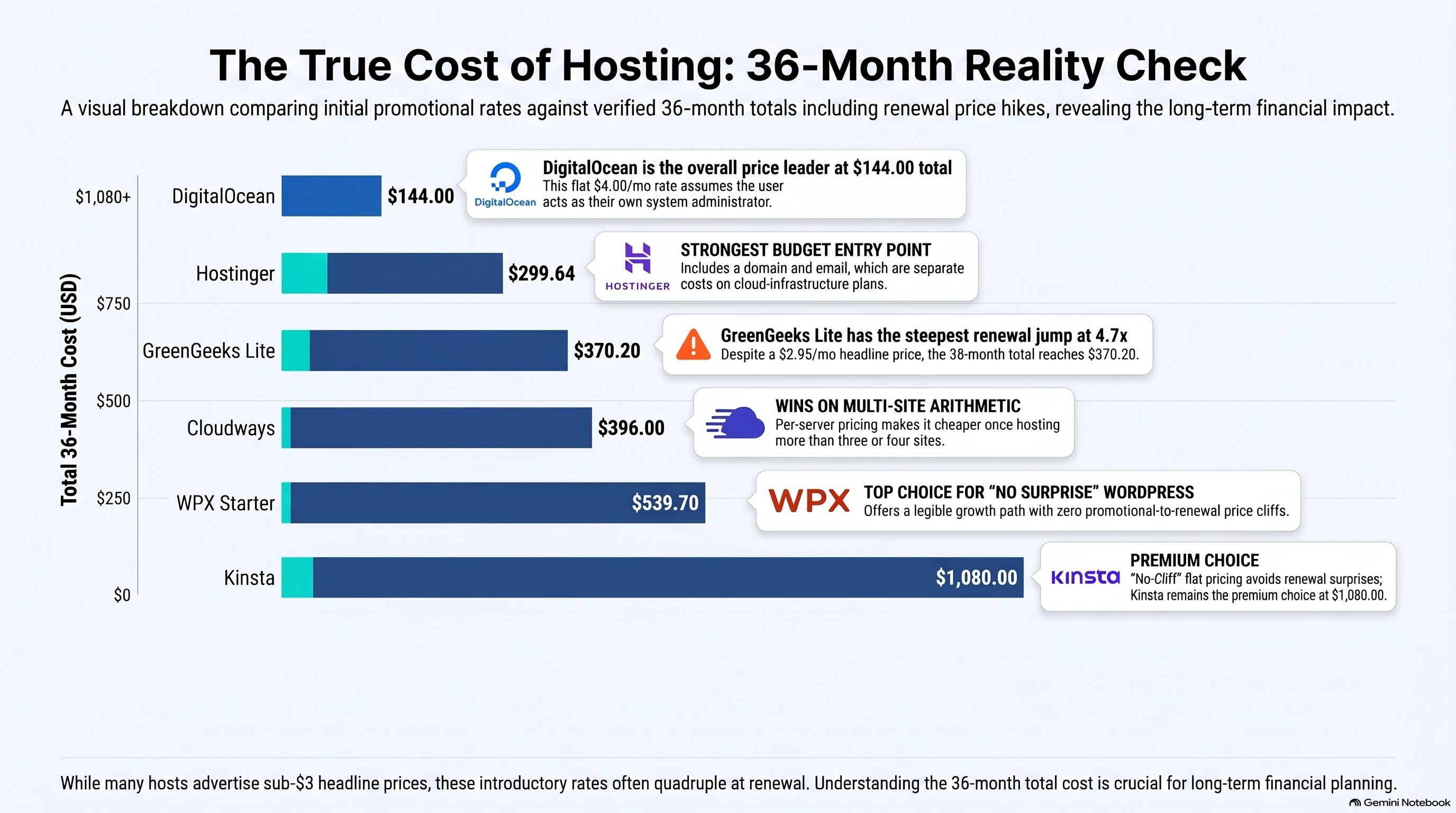
Two of these six hosts advertise a price under $3 per month. Both of them roughly quadruple at renewal. Here is what three years actually costs on an entry plan, using each host’s own published figures:
| Host | Year 1 monthly | Renewal monthly | 36-month total | True monthly average |
|---|---|---|---|---|
| DigitalOcean (1GB droplet) | $4.00 | $4.00 | $144.00 | $4.00 |
| Hostinger | $2.99 | $10.99 | $299.64 | $8.32 |
| GreenGeeks Lite | $2.95 | $13.95 | $370.20 | $10.28 |
| Cloudways (1GB DO) | $11.00 | $11.00 | $396.00 | $11.00 |
| WPX Starter (annual) | $14.99 | $14.99 | $539.70 | $14.99 |
| Kinsta Starter (annual) | $30.00 | $30.00 | $1,080.00 | $30.00 |
The ordering is the point. GreenGeeks advertises a lower headline price than Hostinger and costs more over three years. It also lands within $26 of Cloudways, which is a managed cloud platform with a substantially different feature set. If you choose on the headline number alone, you are choosing on the least informative figure available.
Work out your own number
Change the term and the plan to see where the ordering flips for your situation.
Figures are each host’s own published prices at the time of writing. Promotional rates are applied to the first 12 months only. Where a plan caps the number of sites, the calculator steps up to the cheapest plan that fits.
Try it at five sites. The ordering rearranges completely: hosts that cap you at one site per plan drop out or step up a tier, and Cloudways — which looked expensive at one site — becomes one of the cheapest options available, because its plans are priced per server rather than per site.
The Six Hosts, Compared
| Host | From | Managed? | Best for | The catch |
|---|---|---|---|---|
| Hostinger | $2.99/mo | Yes | New and small business sites | Renewal is 3–4× the promo rate |
| Cloudways | $11/mo | Yes | Agencies and multi-site owners | No root access, no email hosting |
| Kinsta | $30/mo annual | Yes | Revenue-generating WordPress | Expensive; overages billed, not capped |
| DigitalOcean | $4/mo | No | Developers and technical teams | You are the sysadmin; backups cost extra |
| WPX | $14.99/mo annual | Yes | WordPress owners who want it handled | WordPress only |
| GreenGeeks | $2.95/mo | Yes | Environmentally-minded site owners | Renewal is 4.7× the promo rate |
Hostinger — the cheapest way in
Hostinger has the lowest entry price of the six and bundles a domain and email, which the cloud providers do not. For a first site, a portfolio, or a small business site that needs to exist without a monthly argument about cost, it is the straightforward answer.
The thing to understand before you commit is the renewal. The advertised $2.99 applies to your initial term; after that the rate is $10.99. That is not a scandal — most shared hosts work this way — but it means the honest way to evaluate Hostinger is at $10.99, not $2.99. At $10.99 it is still competitive, which is the actual argument in its favour. It just isn’t the argument the pricing page makes.
The performance is better than the price implies. What you give up relative to the managed platforms is headroom: when a site outgrows shared hosting, you feel it, and the upgrade path leads out of the shared tier rather than up within it.
Read the full Hostinger review — including the renewal maths in detail.
Cloudways — the multi-site economics change
Cloudways is a managed layer that sits on top of infrastructure from five providers, DigitalOcean among them. You pick the underlying server, Cloudways handles the management, and you pay from $11 per month for the smallest DigitalOcean-backed server.
The number that matters is not $11. It is that a Cloudways server hosts unlimited sites and unlimited traffic, subject only to the resources you have provisioned. At one site, $11 looks like a premium over a $2.99 shared plan. At five sites it is dramatically cheaper than five shared plans, and at fifteen it isn’t a close contest.
Two real limitations. There is no root access, so if your work requires server-level configuration this is the wrong layer of abstraction. And there is no built-in email hosting, so you will be paying someone else for mail — budget for it rather than discovering it at launch.
A widely repeated claim online is that Cloudways dropped its non-DigitalOcean providers. Its own pricing page still lists all five.
Read the full Cloudways review.
Kinsta — the premium, and whether it is justified
Kinsta is managed WordPress hosting on Google Cloud, starting at $35 per month, or $30 on an annual term. Entry pricing begins roughly where other hosts’ top tiers end, and Kinsta makes no attempt to argue otherwise.
What the money buys is performance and a support conversation with people who will debug WordPress with you rather than direct you to a documentation page. For a site where an hour of downtime costs more than a month of hosting, that trade is easy. For a site with no revenue attached, it is very hard to justify.
The item to check before signing up is overages. Kinsta’s plans include a defined amount of traffic, and exceeding it is billed rather than throttled or capped. That is the correct behaviour for a business site — you would rather pay than go offline — but it means your worst-case invoice is not the number on the pricing page. Model your traffic before you commit.
DigitalOcean — cheapest, on one condition
DigitalOcean is unmanaged cloud infrastructure from $4 per month, and over three years that works out at $144 — less than half of what any managed option here costs. The documentation is the best in the category by a wide margin.
The condition is that you are the system administrator. Security patches, web server configuration, PHP versions, caching, uptime monitoring and recovery are yours. If that sentence reads as a normal Tuesday, DigitalOcean is exceptional value. If it reads as a list of things you were hoping to avoid, the $7 per month you save over Cloudways is the worst bargain on this page.
One specific trap: backups are a paid add-on and they are off until you switch them on. Every year people discover this in the worst possible way. Enable them on day one.
Read the full DigitalOcean review.
WPX — flat pricing, WordPress only
WPX is managed WordPress hosting whose pitch is speed without cloud complexity. Starter covers one site with 10GB of storage at $179.90 annually — $14.99 a month — with Business at five sites and 20GB, and Professional at fifteen sites and 40GB.
The quiet advantage is that WPX has no promotional-to-renewal cliff. The price you evaluate is the price you keep paying. Against Hostinger’s true three-year average of $8.32 or GreenGeeks’ $10.28, WPX’s $14.99 is a smaller premium than the headline comparison suggests, and it comes with no unpleasant anniversary.
The constraint is right there in the name: this is WordPress hosting. If any part of your stack isn’t WordPress, WPX has nothing to offer it.
GreenGeeks — the environmental case
GreenGeeks sells conventional shared, WordPress, VPS and reseller hosting, differentiated by purchasing renewable energy credits at three times its power consumption. Lite covers one site with 25GB at $2.95 promotional, renewing at $13.95. Pro covers unlimited websites with 50GB at $4.95, renewing at $18.95.
Be clear about what you are buying. The hosting underneath is competent and ordinary; the differentiator is the energy offset. If that offset matters to you, this is a legitimate reason to choose a host and there is no need to pretend otherwise.
What deserves scrutiny is the renewal multiple. Lite goes from $2.95 to $13.95 — 4.7×, the steepest jump of any host on this page — which is how a plan with the lowest headline price finishes third-most-expensive over three years. If you want GreenGeeks, the Pro plan at $4.95 renewing to $18.95 hosts unlimited sites, which makes the per-site maths far more defensible than Lite’s.
Read the full GreenGeeks review.
What the Advertised Price Leaves Out
Comparing monthly rates assumes the hosts include the same things. They do not. Four line items move real money and none of them appear in a headline price.
Email. Hostinger bundles email with its plans. Cloudways has no built-in email hosting at all, so a Cloudways site needs mail from somewhere else — Google Workspace, Fastmail, or an equivalent — which for a small team is often $6 to $7 per user per month. On a one-site setup that single omission can exceed the difference between Cloudways and a shared plan.
Backups. On DigitalOcean, backups are a paid add-on that is disabled by default. This is the most consequential default on this page: an unmanaged server with no backups is one bad deployment away from total loss, and the people who discover this are always discovering it at the worst moment. Managed hosts generally include backups, which is part of what the management premium buys.
CDN. Kinsta includes its CDN in the plan price. Where a host does not, you are either adding a service or accepting slower delivery to distant visitors — and a CDN is one of the few performance levers that reliably matters regardless of how your site is built.
Migration. Several hosts migrate existing sites free as an acquisition incentive. It is worth asking before you pay someone — including a developer — to move a site by hand.
Add those up and the practical gap between the cheap tier and the managed tier is consistently narrower than the pricing pages suggest. Not zero. Narrower.
Where Each Host Runs Out of Road
The more useful question is rarely “what does it cost today” but “what happens when this works”. Each host has a different answer, and some of those answers are expensive.
Hostinger and GreenGeeks Lite cap at one site. The second project means a second plan or an upgrade, and on Lite the upgrade to Pro moves you from $13.95 to $18.95 at renewal — but takes you from one site to unlimited, which is the better deal by a distance. If you expect a second site at all, start on Pro.
WPX ladders cleanly and publicly: Starter at one site and 10GB, Business at five sites and 20GB for $24.99 monthly on an annual term, Professional at fifteen sites and 40GB for $49.99, Elite at thirty-five sites and 80GB, and Agency at two hundred sites and 300GB. It is the most legible growth path here — every step is a published number, and none of them involve a renewal surprise.
GreenGeeks continues past shared into self-managed VPS from $9.99 promotional and $19.99 renewal for 2 vCPU and 4GB, and into reseller plans from $19.95 promotional and $34.95 renewal for twenty-five cPanel accounts. The reseller tier is the one worth knowing about if you host for clients and want them separated.
Cloudways scales by adding server resources rather than by changing plan category, which is why the per-site cost keeps falling as you add sites. This is the least painful scaling story on the page, right up until you need root access, at which point there is no upgrade that solves it.
Kinsta scales by tier and by billed overage. The overage mechanism means a traffic spike is absorbed rather than refused, and then invoiced. Model that before you need it.
DigitalOcean scales as far as you are willing to administer, which is effectively unlimited and entirely dependent on your own time. The ceiling here is not technical.
How to Choose, In Order
Work through these in sequence. The first one that applies decides it.
- Is anything in your stack not WordPress? That rules out Kinsta and WPX immediately.
- Are you willing to administer a server? If yes, DigitalOcean is the cheapest credible answer by a wide margin. If no, skip it — the savings are not worth what they cost you.
- How many sites, honestly, in two years? Past three or four, per-server pricing beats per-site pricing and Cloudways wins on arithmetic alone.
- Does the site make money? If downtime has a measurable cost, the Kinsta premium stops being a premium and starts being insurance.
- Otherwise, compare at renewal rates, not promotional rates. On that basis Hostinger is the strongest budget option here, and WPX is the strongest flat-rate one.
Picks by Use Case
| Situation | Pick | Why |
|---|---|---|
| First website, tight budget | Hostinger | Lowest entry cost, domain and email included |
| Agency with client sites | Cloudways | Unlimited sites per server collapses the per-site cost |
| Ecommerce or lead-gen site with revenue | Kinsta | Performance plus support that debugs with you |
| Developer running a side project | DigitalOcean | $4/month and full control, if you accept the admin |
| One WordPress site, no surprises wanted | WPX | Flat pricing with no renewal cliff |
| Sustainability is a decision factor | GreenGeeks Pro | Energy offset with unlimited sites; skip Lite |
Frequently Asked Questions
Why is my hosting bill so much higher in year two?
Because most shared hosts advertise a promotional rate that applies only to your initial term. Hostinger goes from $2.99 to $10.99; GreenGeeks Lite goes from $2.95 to $13.95. Neither is hidden, but both are printed considerably smaller than the headline. Always evaluate a shared host at its renewal price.
Is managed hosting worth paying for?
It depends entirely on whether you would otherwise do the management. Managed hosting buys you patching, caching, backups and a support team. If you are technical and enjoy that work, DigitalOcean at $4 per month is superb value. If you are not, the $7 per month gap between DigitalOcean and Cloudways is among the best money you will spend.
How many sites can I host on one plan?
This varies more than any other factor. Hostinger’s entry plan and GreenGeeks Lite cover one site. GreenGeeks Pro and Cloudways servers host unlimited sites. WPX ladders from one to five to fifteen. It is the single biggest driver of real cost once you have more than one project.
Which is genuinely fastest?
Speed claims are the least reliable part of any hosting comparison, because results depend on your site, your plugins, your caching and where your visitors are. What can be said honestly: Kinsta and WPX both build their entire proposition on performance, and both price accordingly. Treat any benchmark — including ones you read here — as directional rather than definitive.
What is the difference between shared, VPS and cloud hosting?
Shared hosting puts many sites on one server and divides the resources — it is why Hostinger and GreenGeeks Lite can charge under $3. A VPS gives you a guaranteed slice of a machine with defined CPU and RAM, like GreenGeeks’ 2 vCPU and 4GB tier. Cloud hosting, which is what DigitalOcean sells directly and Cloudways sells with management on top, provisions virtual servers you can resize. The practical difference is isolation: on shared hosting another site’s bad day can become your bad day, and on a VPS or cloud server it cannot.
Should I pay monthly or annually?
Annual terms are cheaper on every host here that offers both — Kinsta drops from $35 to $30 a month, and WPX includes two months free on an annual plan. But annual billing on a shared host is also what locks in the promotional rate, so the saving is real in year one and irrelevant afterwards. If you are genuinely unsure about a host, paying monthly for a few months costs little and buys you the option to leave.
Can I move hosts later?
Yes, and you should assume you will. Several hosts migrate you free as an acquisition incentive. This matters because it lowers the cost of choosing wrong: starting cheap and moving up when traffic justifies it is a perfectly sound strategy, and considerably cheaper than over-buying on day one.
How We Assessed These
Every host on this page has been reviewed here individually, and the prices quoted come from each provider’s own published pricing at the time of writing. Where a figure could not be verified against the provider directly, it is not on this page.
We do not run synthetic speed benchmarks, because benchmark results on a test site tell you very little about how your site will perform. We prioritise the things that are verifiable and that change decisions: published pricing across the full term, plan limits, what is included versus billed separately, and the specific conditions under which each host is the wrong choice.
Disclosure: the Hostinger link on this page is an affiliate link, and we may earn a commission if you sign up through it. That relationship did not influence Hostinger’s placement — its renewal multiple is documented above in the same terms as every other host’s. Every other link on this page is a plain link with no commercial relationship attached.
Related
- Best web hosting for agencies — the multi-site economics in detail
- Web hosting with SSH access — full root vs. managed shell, by host
- Best web hosting for dropshipping — WooCommerce stores, not Shopify
- Best SEO tools — what to point at the site once it’s live